Windows automation tool

KeyPresser: Professional Windows Automation
Automate repetitive tasks

KeyPresser automates Windows tasks with window recording and playback, image recognition, Mouse Assistant, and Python scripting. More than 10,000 downloads and a user rating of 4.8. Meet KeyPresserNext →

Released Next generation

Introducing KeyPresserNext

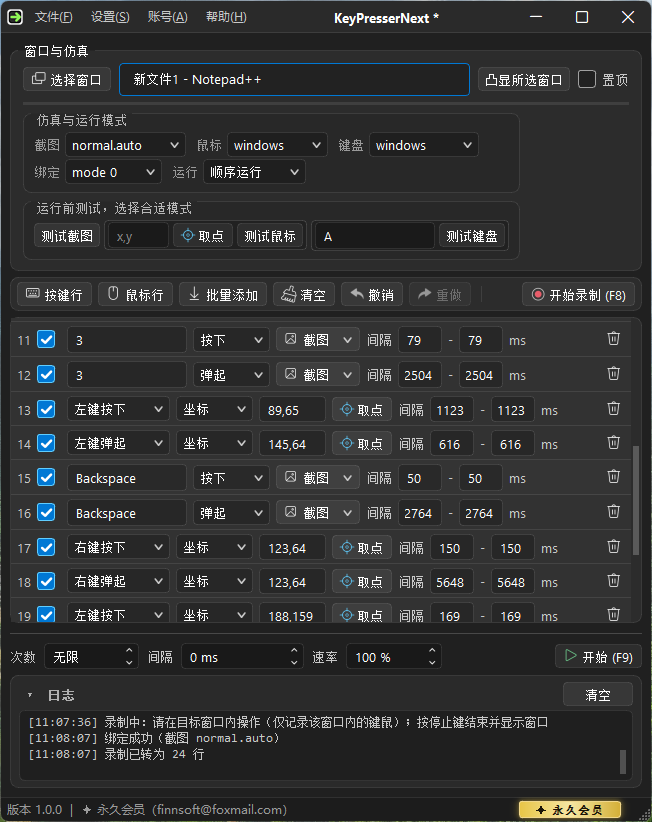
Build keyboard, mouse, and image recognition actions in one editor. The new engine lets you switch between sequential and independent execution. KeyPresserNext is available alongside classic KeyPresser.

  • Manage keyboard, mouse, and image recognition in one editor without copying settings between tools
  • Edit key-down and key-up actions separately and fine-tune delays and coordinates after recording
  • Switch between sequential and independent execution. Bind a window, capture coordinates, and test input immediately.
  • NextCore improves background input and image recognition
KeyPresserNext interface showing window binding, action list, run settings, and logs Interface preview

Promotion

Current offers

1 ✍️

Publish your content

Publish an article or video about KeyPresser on a media site, website, or WeChat public account

→
2 📊

Reach the targets

👁 1,000+ views 👍 50+ likes
→
3 🎁

Claim your reward

One year of membership

⚠️ Important information

Antivirus tools such as 360 can incorrectly flag or remove files during installation. If KeyPresser fails to initialize, check whether any files were quarantined and reinstall from the official download.

Overview

Interface and features

Eight automation modules in an easy-to-use interface.

KeyPresser Professional 6.3.0 main interface
⌨️

KeyPresser

Basic keyboard automation

  • Simulate keyboard input
  • Custom key sequences
  • Adjustable delay between keystrokes
👁️

KeyPresser with Image Recognition

Keyboard automation with built-in image recognition

  • Locate targets using image recognition
  • Automatically identify specific elements on screen
  • Combine image recognition with automated key presses
🖱️

Mouse Assistant

Send mouse messages to a target window

  • Send clicks to specified coordinates
  • Single and double clicks with the left, right, or middle mouse button
  • Adjustable click locations and intervals
🎯

Mouse Assistant with Image Recognition

Mouse automation with built-in image recognition

  • Run mouse actions when a matching image is found on screen
  • Single and double clicks with the left, right, or middle mouse button
  • Adjustable actions and delays after a match
🔌

KeyPresser Hardware Edition

Arduino-based keyboard automation

  • Generate physical key presses using Arduino hardware
  • Hardware-level key simulation
  • Check the Arduino connection before use
🎬

KeyMouseGo

Keyboard and mouse recording and playback

  • Record keyboard and mouse sequences
  • Play back recorded actions
  • Adjustable playback count and delay
📹

Window Recording and Playback

Record keyboard and mouse input and replay it in the selected window using the configured modes

  • Bind to a target window with Windows or DX input modes
  • Adjust playback count, interval between runs in minutes, and playback speed
  • Global shortcuts to record, play, or stop, with quick script loading
🐍

Python Scripting

Write, run, and manage Python scripts

  • Write and run Python scripts
  • Script management interface
  • Extensible automation scripts

Stats

KeyPresser in numbers

10,000+
Downloads
4.8
User rating
99%
Stability
24/7
Support

Reviews

User reviews

★★★★★
"Repetitive clicking and form filling used to take ages. I record the workflow and run it in the background while I work on something else."
Z

Mr. Zhang

Freelancer · 3 months of use

★★★★★
"I often have to enter the same content at work. KeyPresser's randomized intervals make the input look natural, and the system hasn't detected it. Highly recommended!"
L

Ms. Li

Office worker · 6 months of use

★★★★☆
"The three keyboard emulation modes cover different situations, and the tutorials made it easy to get started. I'd love to see even more advanced features."
W

Wang

University student · 2 months of use

★★★★★
"Image recognition and Python scripting are handy. I saved my setup and can run it again anytime. It's much more stable than the tools I used before."
C

Mr. Chen

Automation enthusiast · 4 months of use

Changelog

Changelog

KeyPresser 6.3.3

Latest release

• Support for 16-bit color applications: older applications can run alongside KeyPresser without forcing the screen to switch back to 32-bit color.

KeyPresser 6.3.2

Previous release

• Fixed known bugs

KeyPresser 6.3.1

Previous release

• Fixed overlay click-through and shortcut visibility

KeyPresser 6.3.0

Previous release

• Added Window Recording and Playback: record keyboard and mouse actions after selecting a window, then replay them using the selected input modes.

• Set playback count, the interval between runs in minutes, and playback speed. Scripts are saved as .kprec. Scripts can be loaded, renamed, or deleted.

• Default global shortcuts: F8 to record / F9 to play / F10 to stop (customizable). The app minimizes during recording and playback and shows the stop shortcut.

• Shows the stop shortcut in the lower-right corner during execution and improves focus after window selection

• Use Window Recording and Playback for a bound window and KeyMouseGo for general desktop recording

KeyPresser 6.2.1

Previous release

• Automatic updates

KeyPresser 6.2.0

Previous release

• Key configuration now uses Start recording: click the field and press the desired keys directly.

• Supported in Standard, Image Recognition, and Hardware editions:key combinations (for example, Ctrl+A). Enter another key combination to replace it.

• Improved display of numpad, arrow, punctuation, and other special keys

• Reads existing configuration files automatically

KeyPresser 6.1.0

Previous release

• Upgraded keyboard and mouse configuration to dynamic action rows that you can add, remove, and import in bulk

• Unified the standard, hardware, and image-based keyboard modules and both mouse modules

• The action list scrolls as it grows, and editing is locked while running

• Reads existing INI files automatically

KeyPresser 6.0.1

Previous release

• New in Standard:long presses. Independent mode supports holding keys.

• Long presses are disabled in sequential mode and restored when switching back

KeyPresser 6.0.0

Previous release

• Licensing upgrade:online licensing with an email account is the primary licensing method. Local activation codes and a three-day trial remain available.

• Renew monthly, annual, or lifetime membership in the app and sync membership after payment

• Up to three devices can be online per account. Existing local activation codes can be linked to an account.

• Online licensing includes a 24-hour offline grace period and email allowlist validation

• Checks for new versions at startup and retrieves plan prices and announcements from the server

• The license window displays a QR code for QQ group 901882848

KeyPresser 5.4.x

Previous release

• 5.4.0 added Python scripting

• 5.4.3 added trigger mode selection

• 5.4.8 improved screenshot selection

• Fixed issues with shortcuts and tasks continuing after closing

KeyPresser 5.3.0

Previous release

• KeyPresser Hardware Edition can work with apps that block software input

• Simulate physical key presses with an Arduino Leonardo controlled through KeyPresser

• 5.3.5 added key combinations to Standard. 5.3.6 added Mouse Assistant Standard.

Highlights

  • Use Arduino to generate physical input where software input is blocked
  • Flexible control with complex key sequences and combinations
  • Extend automation with mouse actions, batch commands, and more

See the hardware tutorial in the user guide

KeyPresser 5.2.0

Previous release

• Added KeyPresser with Image Recognition to trigger key presses when a target image is found

KeyPresser 5.1.0

Previous release

• Integrated keyboard and mouse recording

KeyPresser 5.0.0

Previous release

• Updated architecture for wider application compatibility

Help

Help

The official user guide covers setup, each module, and the upgrade to 6.0.

Open the user guide

How to

Getting started with KeyPresser

In about 10 minutes, install the app, bind a window, then record or build a workflow and run it.

  1. Download and install

    Open the official downloads section and use the primary or mirror link. Add the installation directory to the antivirus exclusion list if needed to reduce false positives.

  2. Select the target window and configure input

    Select a target window, configure screenshot, mouse, and keyboard modes, and test the binding. See the features section.

  3. Record or build a workflow, then run it

    Use Window Recording and Playback, KeyMouseGo, or another module to build your actions. Set the run count and interval, then start. See the help section.

FAQ

FAQ

Quick answers about KeyPresser and KeyPresserNext.

What is KeyPresser?
KeyPresser automates repetitive keyboard and mouse tasks on Windows. It supports window recording and playback, image recognition, Mouse Assistant, Python scripting, and background execution. It has over 10,000 downloads and a 4.8 user rating.
How does KeyPresserNext compare with KeyPresser?
KeyPresser Professional (currently 6.3.3) offers separate automation modules. KeyPresserNext combines keyboard, mouse, and image recognition in an editable action list. It supports sequential and independent execution and uses the new NextCore engine. Both editions are available, and the classic edition will continue to receive updates. See the KeyPresserNext product page.
How do I download KeyPresser?
Open the downloads section (https://keypresser.onepeak.cn/index-en.html#download) for the primary and mirror KeyPresser Professional downloads. For KeyPresserNext, see the product page to download it.
What features does KeyPresser support?
The eight modules cover key simulation, image-based key presses, Mouse Assistant, image-based mouse actions, window recording and playback, KeyMouseGo, Arduino hardware, and Python scripting. See Features.
What if antivirus flags the installer?
Antivirus tools can falsely flag keyboard and mouse automation software. Add the installation folder to the trust or exclusion list. The official QQ user group is 901882848.
Does KeyPresser work in the background?
KeyPresser Professional supports background keyboard and mouse input in a bound window. Compatibility depends on the target application and input mode. Test input in the target window before running your workflow.